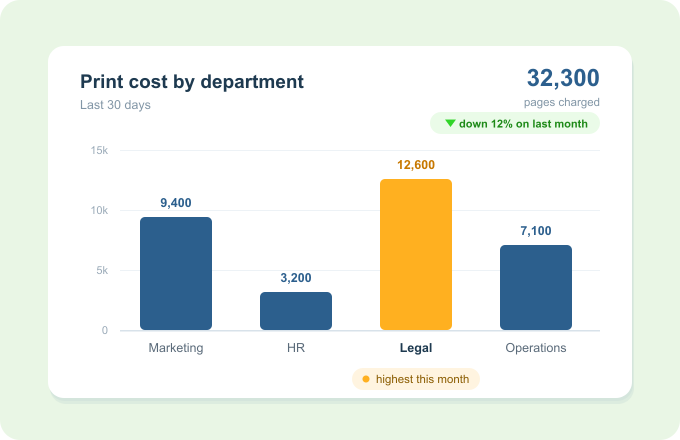
Know what every department actually spends on print
Print Director records every print, copy and scan against the department, faculty or cost centre that produced it, so the cost lands with the team that owns it, automatically, with nothing to capture by hand.
Shared devices, unshared bills. Every page finds the team that printed it.
The problem
Shared printers, unshared bills
A shared fleet means print cost sits in one big IT line item that nobody owns.
No one can say which department, campus or cost centre is actually driving the spend.
Chargebacks and budgets rely on manual meter reads and spreadsheets.
Wasteful habits never surface, because they’re invisible at the team level.
Department cost tracking puts every page against the team that printed it.
How it works
Every page, attributed automatically
Users are known Because people authenticate to print and sync from your directory with their department, Print Director already knows which team each job belongs to.
Costs land in the right place
Every print, copy and scan is priced and recorded against that user’s department, faculty or cost centre, with no capture step.
See it and share it
Break spend down by department in summary or detailed reports, scheduled and emailed automatically.
Key Benefits
Why teams adopt department cost tracking
Accountability by default
Every page has an owner, so budgets and chargebacks stop relying on guesswork.
Spot the outliers
See which teams or sites drive volume and colour, and tackle waste where it actually is.
No manual capture
Attribution rides on the login users already do, not a spreadsheet someone has to maintain.
Ready for chargeback
Clean per-department figures you can hand to Finance or feed into internal recoveries.
Works with what you already have
It already knows your org chart
Departments sync automatically from Active Directory and Microsoft Entra ID, so the structure stays current.
Rides on the same authentication as Secure Print Release: one login releases the job and records who and which department.
Feeds Extensive Reporting for scheduled per-department breakdowns in Excel, PDF or Word.