

PRINT DIRECTOR | AUTOMATIC DISBURSEMENT BILLING
Every billable page and call, on the invoice, not lost
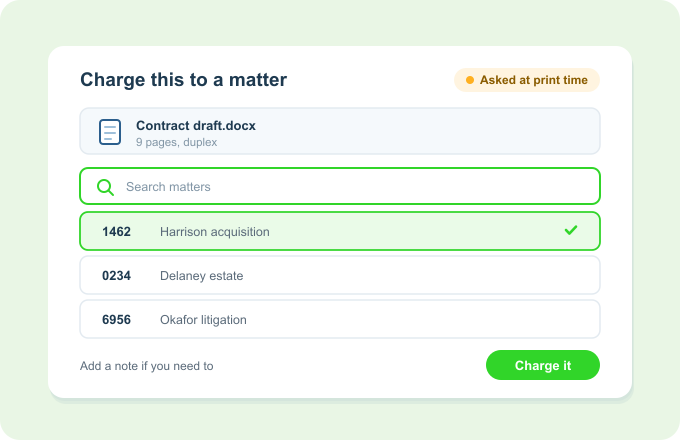
Print Director captures every print, copy, scan and phone call, then prompts the user to tag it to the client matter or project that incurred it. Disbursements reach the bill without anyone keying them in.
The matter gets assigned at the moment of printing, while the user still knows exactly what it was for.
The problem
Billable costs that quietly leak away
- Print and call disbursements depend on people remembering to log them, so recoveries slip.
- “I’ll code it later” means never, for a busy fee earner.
- By billing day nobody remembers who printed what, for which client, or why.
- Costs that never get captured are simply written off, month after month.
- Manual capture is inconsistent between staff and between matters.
Automatic Disbursement Billing captures the cost at the moment it happens, and asks who it belongs to there and then.
How it works
Captured at source, coded on the spot, billed automatically
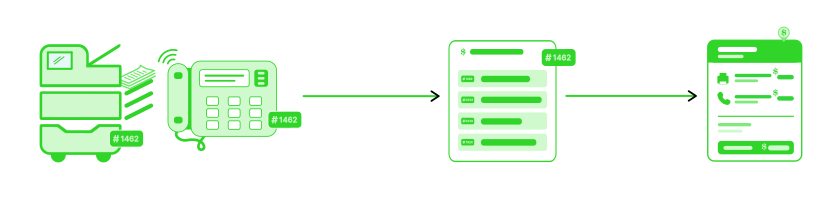
- The cost is captured as it happensEvery print, copy, scan and phone call is recorded the moment it’s produced, with no log to fill in.
- You are asked which matter it belongs toA prompt appears as soon as the job finishes, either on the workstation or at the printer’s own panel, with a searchable list of live matter and project codes and room for a billing note. It can be required for fee earners and optional for everyone else.
- It flows to billingCaptured disbursements are ready to recover, and can feed your practice management system for invoicing.
Key Benefits
Why firms switch to Automatic Disbursement Billing
- No missed recoveries If it was printed or dialled, it was captured. Nothing depends on memory.
- Coded while it’s freshThe prompt arrives the moment the job finishes, so the matter is assigned when the user still knows what it was for, instead of being reconstructed at month end.
- It works the same for everyoneEvery fee earner, every matter, every device. Recovery doesn’t depend on who happened to be at the printer that day.
- Room for contextA note can travel with the code, so the bill carries the explanation as well as the amount.
- Straight to the invoiceCaptured costs are ready to bill and can flow into your practice management system.
Works with what you already have
It closes the loop from print to invoice
- The prompt appears on the workstation or at the device panel, so it reaches people wherever they work.
- Stays stocked with current codes through Import Matter Codes from External Sources, so nobody bills to a closed matter.
- Feeds leading legal practice management systems for invoicing.
- Prices per device, client, matter or project through Variable Pricing.