PRINT DIRECTOR | ACTIVE DIRECTORY & MICROSOFT ENTRA ID INTEGRATION
Your directory already knows your users. So does Print Director
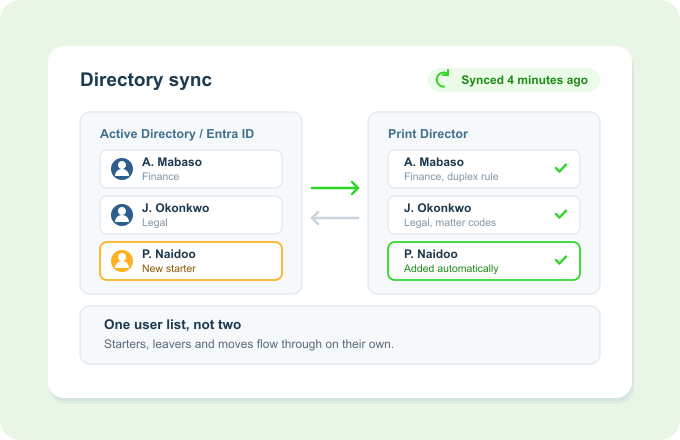
Print Director syncs users, departments, rule assignments and workflow access straight from Active Directory and Microsoft Entra ID. The people, teams and permissions in your print environment always match your directory, with no second list to maintain.
One source of truth. Add someone once and they're everywhere they need to be.
The problem
Two user lists, always out of step
Every new starter, leaver and move has to be repeated in yet another system.
Print permissions and quotas drift out of line with who is actually in each team.
Departments in reports don’t match the org chart, so the numbers get questioned.
Manual user admin is slow, and stale accounts are both a security and a cost risk.
Directory integration makes your directory the single source of truth.
How it works
Sync once, stay in sync
Connect to your directory
Point Print Director at Active Directory over LDAP, or at Microsoft Entra ID (formerly Azure AD).
Users and departments come across
People arrive already sorted into their departments, with rule assignments and workflow access attached.
Changes flow automatically
Starters, leavers and moves in your directory update Print Director on their own, with no double entry.
Key Benefits
Why directory integration earns its place
One source of truth
Your directory drives print, so there’s never a second user list to reconcile.
Right access, automatically
Rule assignments and workflow access follow the user, and leavers drop off without a manual step.
Reports that match the org chart
Departments come straight from the directory, so per-team figures line up with how the business is really structured.
Less admin, fewer stale accounts
No re-keying users, and no forgotten accounts lingering after someone leaves.
Works with what you already have
It fits the identity platform you already run
Works with Active Directory over LDAP and with Microsoft Entra ID (formerly Azure AD).
Feeds department cost tracking and rule-based quotas with the correct team for every user.
The same identity powers Secure Print Release at the device panel.