

PRINT DIRECTOR | HOW IT COMPARES
Print Director compared with cloud-hosted print management
Cloud-hosted print management promises less to look after. Before you choose, it is worth knowing where your data, your sign-ins and your print jobs would live. Here is how Print Director answers.
The questions worth asking before you choose
| Question | Print Director |
|---|---|
| Where are print records kept? | In your own database, on your premises or on a hosted server you choose. |
| What does the database store? | Usage records, document names and costs. Never the document contents. |
| Where are linked cloud sign-ins kept? | Encrypted on your own Print Director server. |
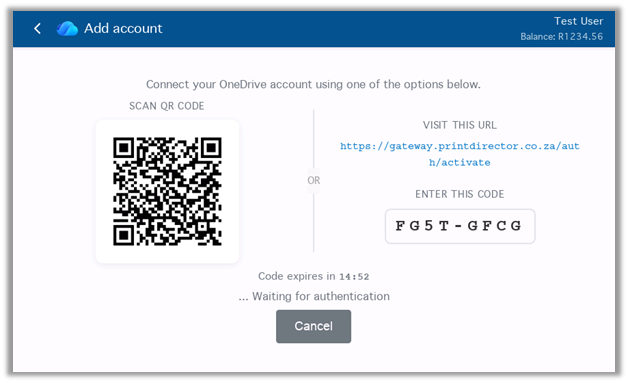
| Where do cloud scans travel? | From your Print Director server directly to your OneDrive, SharePoint, Google Drive, Dropbox or Box. |
| Do printers need internet access? | No. The Print Director server handles the cloud connections. |
| Are firewall changes needed at your office? | No inbound firewall rules, including for hosted installations. |
| Is extra hardware needed at the printer? | No separate release terminal is required on supported Konica Minolta, Lexmark and HP models. An optional card reader is needed for card sign-in. |
| What happens if the internet drops? | An on-premises installation carries on with sign-in, print release, copying and scanning to local destinations. Cloud scanning waits for the connection. |
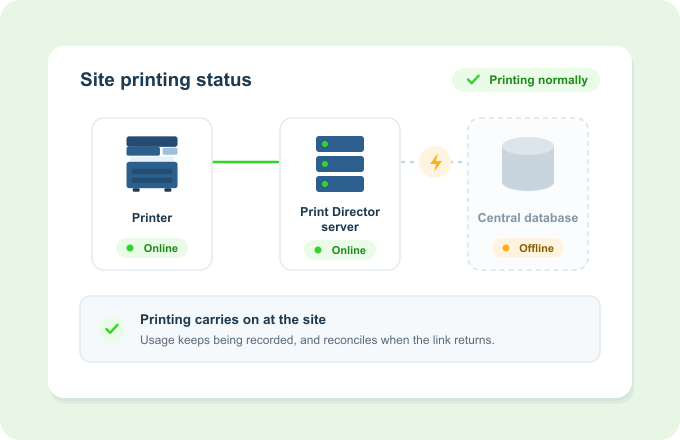
| What happens if the database connection drops? | Print Director uses its local cache, records every transaction and catches up automatically when the connection returns. |
| Can you keep the printers you have? | Yes. Supported Konica Minolta, Lexmark and HP models can be used together on one system. |
| How is it licensed? | By printers, telephone systems (PBXs and phone extensions) and features. Never per user. Monthly rental, or a once-off licence with Annual Software Maintenance. |
| Are telephone costs covered? | Yes, tracked alongside printing. |
| Who develops and supports it? | Developed in South Africa. Supported by your local Print Director partner. |
Ask any other provider you are considering the same questions.
Your data
Your data stays yours
- Your records, your database. Print Director keeps its records in your own database, on infrastructure you choose. It stores usage records, document names and costs, never the documents themselves.
- Your sign-ins, your server. When a user links OneDrive or Google Drive at the printer, the sign-in is stored encrypted on your own Print Director server, not on the printer.
- Your documents go direct. Cloud scans travel from your Print Director server straight to your cloud provider. They do not pass through Blue Swift.
- You decide where the data sits and who can see it, which helps with POPIA.
At the printer
Nothing extra at the printer
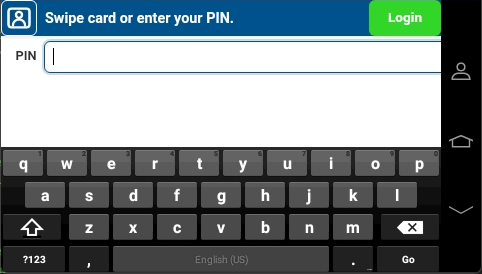
- The printer’s own screen does the work. Sign in by PIN, card or username, release jobs, copy, scan and use cloud workflows on supported Konica Minolta, Lexmark and HP models.
- No separate release terminal. An optional card reader is needed only for card sign-in.
- Printers stay off the internet. Cloud scanning and printing go through your Print Director server, so printers only need to reach that server.
When the connection drops
Keeps working when the connection drops
- If the internet drops, an on-premises installation carries on with sign-in, print release, copying and scanning to local destinations. Cloud scanning waits until the connection is back.
- If the database connection drops, Print Director switches to its local cache, keeps working and records every transaction. Everything catches up automatically when the connection returns.
Licensing
Licensing that doesn't count heads
- Licensed by printers, telephone systems and features, never per user. Adding staff adds no licence cost.
- Two ways to pay: Monthly rental, or a Once-off licence with Annual Software Maintenance. Both include updates, upgrades and limited remote support.
- Use the printers you already have. Supported Konica Minolta, Lexmark and HP models work together.
Prefer a hosted server?
Print Director can run on a hosted server instead of one in your office. You choose where held print jobs are stored: on a local workstation or on the PDServer, including a hosted PDServer. Sign-ins stay encrypted in your own installation, no inbound firewall rules are needed at your office, and licensing still never counts users. Access to the hosted server itself can be restricted, for example to your office’s internet address.