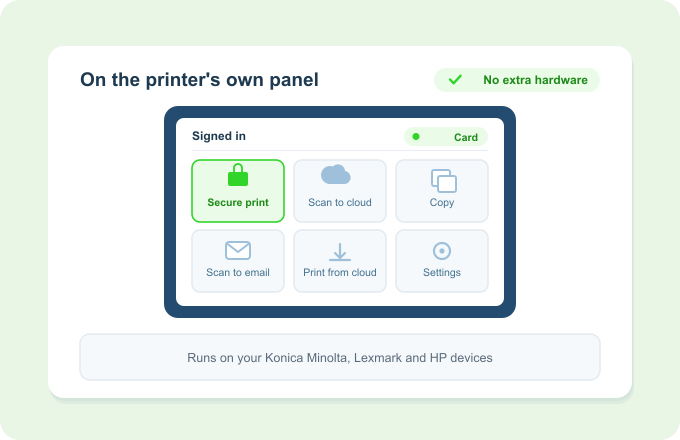
Print Director lives on the panel, not on a box beside it
Print Director runs as an embedded app right on your Konica Minolta, Lexmark and HP devices. Users authenticate, release jobs and choose workflows on the screen they already use, with no print-release terminal or extra hardware to buy.
The software is built into the machine you already own. No extra gadget to buy, mount or maintain.
The problem
One more box to buy, mount and maintain
Bolt-on release terminals mean more hardware to purchase, power and support at every device.
Staff face a separate gadget with its own quirks, instead of the panel they already know.
Extra hardware is one more thing to break, and one more thing to replace at fleet refresh.
Embedded App Support puts Print Director on the devices you already own.
How it works
On the device, on day one
The app goes on the device
Print Director installs as an embedded app on supported Konica Minolta, Lexmark and HP machines.
Users sign in at the panel
Authenticate with a PIN, embedded-app login, or a supported RFID card reader, right on the device screen.
Everything happens on-screen
Release held jobs, run workflows and identify yourself for tracking, all from the panel.
Key Benefits
Why running on the device wins
No extra hardware
No release terminals or add-on boxes to buy, mount or maintain. The app runs on the device itself.
One familiar screen
Staff work on the panel they already use, so there’s very little to learn.
Three major brands
Konica Minolta, Lexmark and HP, all managed from the same platform.
An instant upgrade
The app secures your prints and allows you to release at any printer. Plus scanning and printing from OneDrive, Google Drive, Dropbox and other cloud storage. Capability the device did not have out of the box.
Works with what you already have
It meets your fleet where it is
Embedded on Konica Minolta, Lexmark and HP. See the Knowledge Base for the full per-manufacturer device list.
Authenticate with PIN, embedded-app login, or supported RFID card readers.
The panel is where Secure Print Release, department cost tracking and cloud workflows all come together.
Ready to run print management on the devices you already have?