

PRINT DIRECTOR | EMAIL-TO-PRINT
If it can send email, it can print
Staff, visitors and students email a PDF to your print mailbox, walk to any Print Director printer and release it. No drivers, no apps, no joining the office network.
Email a PDF from any device, then release it at any Print Director printer
The problem
Not every device can print
- Phones, tablets and personal laptops don’t have your printer drivers, and IT doesn’t want to install them.
- Visitors and contractors need to print one document, but they aren’t on your user list.
- “Can you print this for me?” means forwarding attachments to a colleague with a PC.
- Documents printed that way skip your tracking, rules and billing.
Email-to-Print closes that gap. Any device that can send email becomes a tracked, secure way to print.
How it works
Email it, walk up, release it
1
Email a PDFSend it to your organisation's print mailbox from any device.
2
Your job waits securelyPrint Director holds it with your other waiting jobs, ready for release.
3
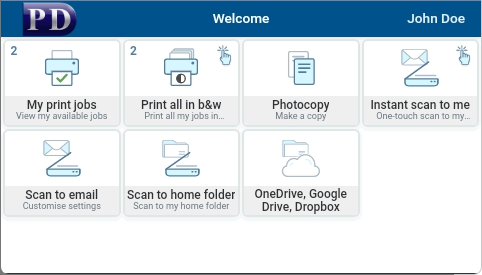
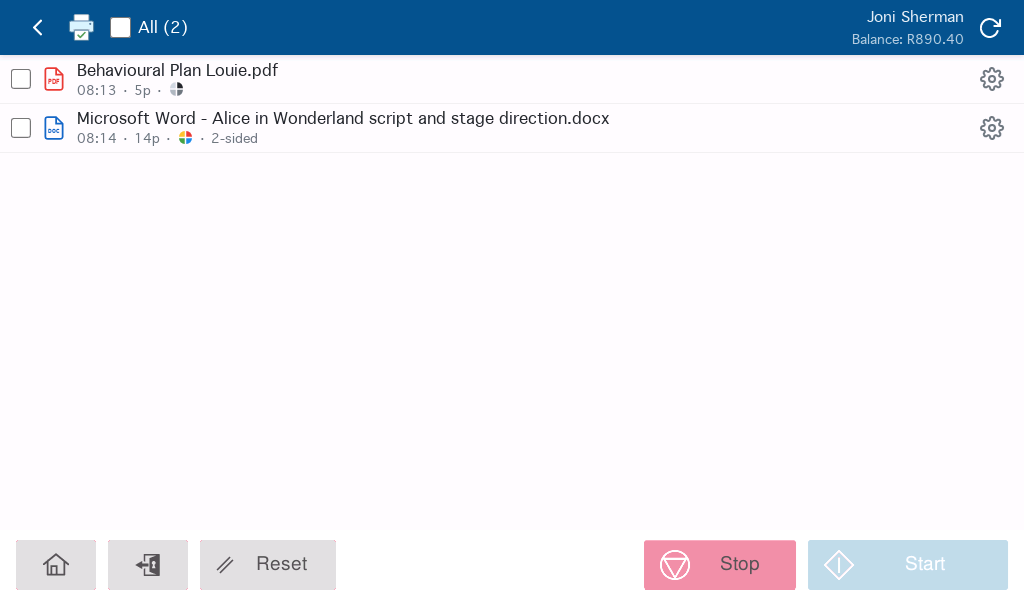
Release it at any printerSign in at the panel, choose the job, change the number of copies if you need to, and it prints in front of you.
Guests
Visitors can print too
When someone Print Director doesn’t recognise emails a document, they receive a reply with a one-time PIN. They enter the PIN at the printer to release their job. Guests don’t need an account, and every guest job is still recorded.
Key benefits
Why organisations add Email-to-Print
- Any device
Phones, tablets, Macs, Chromebooks and personal laptops, with nothing to install. - Still secure
Jobs wait until the person is at the printer, the same as every other released job. - Still tracked
Emailed jobs are priced, billed and reported like any other print. - Less IT work
No drivers or queues to set up on devices you don’t manage.
Works with what you already have
Uses your existing mailbox and printers
- Receives from your existing mailbox using Office 365, IMAP or POP3.
- Released through Secure Print Release on your Print Director printers.
- Sits alongside AirPrint, Mopria and Chrome OS printing, so every kind of device is covered.