

Released jobs are held at a Lexmark printer instead of printing
Released jobs are held at a Lexmark printer instead of printing
Symptom
A user releases a job at a Lexmark printer and nothing prints. Print Director shows the job as sent: the PDAgent delivered it to the printer without an error and the release screen closed normally. The job does not appear in the user’s waiting list again.
The job is not lost. It is sitting in the printer’s own held jobs (on the panel, Held Jobs or Job Queue), under the user’s name.
Cause
On the printer, Require All Jobs to be Held is turned on. With it on, the printer holds every job it receives, whatever the job asks for, until someone releases it again at the printer’s own Held Jobs screen. A job released by Print Director is just another incoming job, so the printer holds it too.
Print Director has already released the job by the time the printer receives it, and does not release it a second time from the printer’s held jobs.
How it shows in the printer’s diagnostic log
The quickest check is the printer’s Held Jobs screen: the released job is there under the user’s name.
The printer’s Embedded Solutions diagnostic log shows the hold only when debug logging is turned on; at the default log level these lines are not written. To turn debug logging on and read the log:
- In a browser, open the printer’s Embedded Solutions service menu:
http://<printer address>/esf/prtappse/semenu. If the printer asks for a login, log in as an administrator. - Click Set logging level. Under “Allow debugging entries in the log?”, choose Yes and click Submit.
- Go back to the menu and click Clear system log, then Submit, so the log holds only the test.
- Release a job from Print Director at the printer.
- Go back to the menu and click Show system log. The page starts “Embedded Solutions Diagnostic Log”. Save it (for example with the browser’s Save Page As) if you need to send it to support.
- When you have finished, open Set logging level again, choose Default and click Submit.
The log can also be read directly at http://<printer address>/cgi-bin/prtapplog.
With debug logging on, the released job arrives and is then moved to a hold workflow instead of printing:
event=JM_WORKFLOW_CREATED_EVENT, id(job,parent)=8,, state=, type=DataStream Workflow
...
event=JM_WORKFLOW_CREATED_EVENT, id(job,parent)=12,, state=, type=Print And Hold Workflow
event=JM_STATE_CHANGED_EVENT, id(job,parent)=12,, state=Held, type=Print And Hold Workflow
Job held for: 12
...
event=JM_STATE_CHANGED_EVENT, id(job,parent)=8,, state=Complete, type=DataStream Workflow
Print And Hold Workflow with state=Held is the printer holding the job. The incoming stream still ends Complete with status success, which is why the PDAgent reports the job as sent.
Resolution
- Open the printer’s Embedded Web Server in a browser (
https://<printer address>) and log in as an administrator. - Go to Settings > Security > Confidential Print Setup.
- Clear Require All Jobs to be Held.
- Click Save.
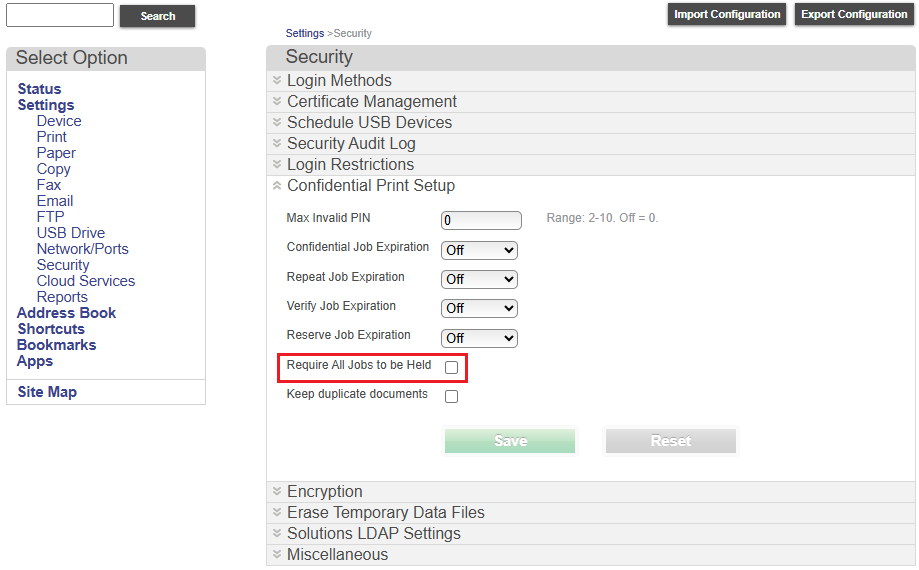
The change applies at once and needs no Print Director change. Leave the other Confidential Print Setup values as they are.
Jobs already held at the printer stay held. The user can print them from the printer’s Held Jobs screen, or delete them there and release again from Print Director.
Checking it is fixed
Release a job from Print Director at the printer. It prints straight away and nothing new appears in the printer’s Held Jobs.
Related causes
If the setting is already off and released jobs still end up in the printer’s Held Jobs, the job itself is asking to be held. Check the driver on the Print Director print queue (on the PDAgent and in the user’s printing preferences) for a Print and Hold option (Confidential, Repeat, Reserve or Verify) and turn it off.
| Document revision date: 2026/10/21 Software version: 2.5.15.3 |
Released jobs are held at a Lexmark printer instead of printing