

Skip to main content
HP Universal Card Reader X3D03A – AWID 125khz card on HP devices
HP Universal Card Reader X3D03A – AWID 125khz card on HP devices
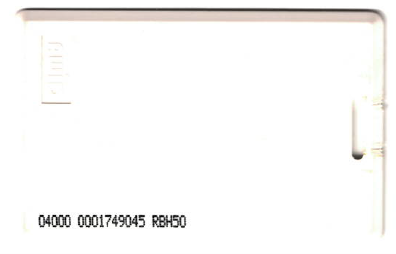
For this example we will be using the card pictured above.
HP Card Reader Configuration Utility
Firstly, we must configure the reader to read the specific card type. This reader can read up to 4 different card types at the same time (both 13.5mhz and 125khz).
- Plug the card reader into the USB port of a Windows PC and start the HP Card Reader Configuration Utility.
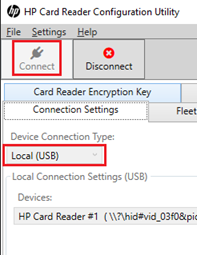
- On the Connection Settings tab, change the Device Connection Type to Local (USB).
- Click Connect. It might fail to connect on first try. If so, try again.
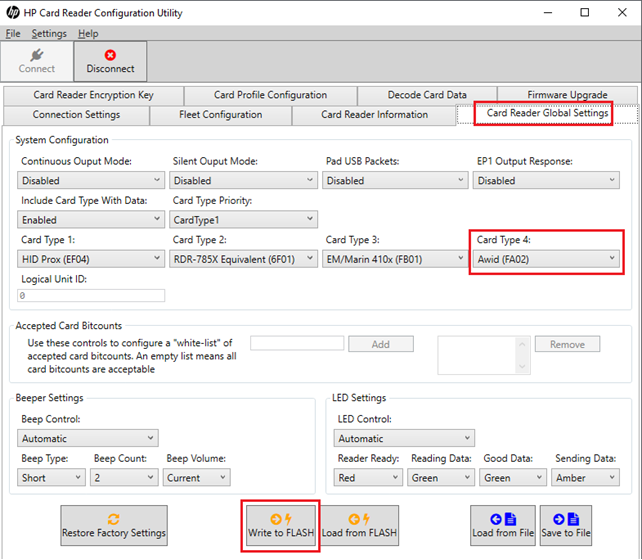
- Click the Card Reader Global Settings tab.
- Ensure one of the selected card types is Awid (FA02).
- Click Write to FLASH.
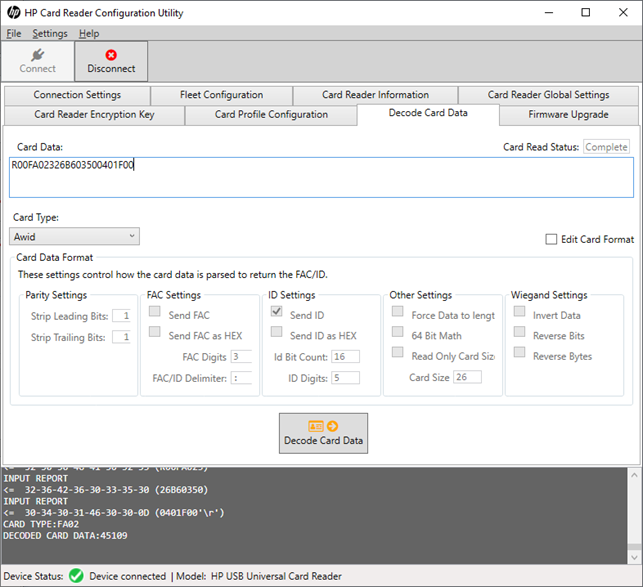
- Now test that the reader is working by clicking the Decode Card Data tab and scanning the card. If it doesn’t scan, perhaps the card type is incorrect. Try setting a different Card Type and then Write to FLASH and try again.
- Our example card above resulted in Card Data of R00FA02326B603500401F00 and decoded card data of 45109.
Card settings – Resource Manager
Now plug the card reader into the HP device.
- Open Resource Manager and navigate to Device Management > Shared Devices.
- Double click the HP device.
- On the Controller tab, ensure the Controller Type is set to HP Integrated.
- On the Authentication tab, in the Authentication type frame, ensure the Identification method drop-down is set to either Card swipe or keypad login or Card swipe only.
- Click the Auth Device tab.
- In the USB device registration frame, click the Choose known VID/PID button.
- Choose HP Universal Card Reader X3D03A and click OK.
- In the Card reader settings frame:
- Choose whether self-registration of cards will be allowed and the authentication requirements for self-registration.
- In the Byte conversion method drop down, choose Bytes are ascii codes for Hex characters.
- In the Data ordering drop-down, choose Reverse bytes.
- Now the Start bit and Bit length must be set based on the number you would like to extract from the binary string. For example, to get the number 45109 that the HP Configuration Utility decodes, we would choose Start bit: 38 and Bit length: 17. However, to get the number 1749045 that is printed on this particular card, we would choose Start bit: 24 and Bit length: 31.
| Document revision date: 2020/06/01 Software version: 2.2.64.0 |